So I have worked on the feedback I got from the group and tomorrow we have another skype-meeting where we will show what we have done with the poses that needed work and any other work in progress.
I am currently working on the rest of the poses for the performance and hit a point where more research was needed. I realized I had way too little knowledge on how juggling works, and to be honest the performance in the green-screen studio wasn't exactly impressive juggling-wise.. Hehe.
And also when it is a mime performing a juggling act it needs to be made quite clear what's going on, otherwise it's more like a clown trying to look funny by doing random hand-gestures.
So I started researching it and found this video very useful. It's a tutorial on how to juggle, and it shows both close-ups of the hands and slow motion of the movement.
Think I will be using this video as additional reference-footage for the performance.
The notes I've taken so far is:
- Shoulders out, arms close to the body.
- Forearm and wrist/hand does most of the work
- When he catches the ball, the arm moves down before throwing it up again.
- Head up -> Follows the ball to see where it goes -> So that he can catch it.
lørdag 10. mars 2012

fredag 9. mars 2012
Feedback n.01
After last nights Skype-feedback session I now know which of my key-poses that seemed to work and which ones needed to be changed or thrown away.
I have made an image so you can see which poses that needs more work:
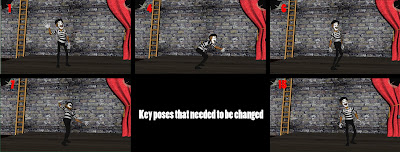
Pose 1: This is the first appearance of the character on screen so this one might just be the most important pose of them all. It should define the characters personality & mood as well as what he actually is doing in the pose.
The comments where mainly that he looked to relaxed, so I'm going to try one strong line of action to the opposite side and see if that works better. At the moment the hip makes him look to laid back, compared to what I want him to communicate to the audience. He should be excited and full of joy.
Pose 4: Alfonso's left hand is barely visible, so either hide it completely or move it a bit forward.
Pose 6: Out of balance.
Pose 7: Is a hard pose to read, I got some suggestions that I might rise one leg up in the air. The point of this pose is to make him grab the rope with more force and excitement (really overdoing it). This might actually be more of a fun and interesting breakdown than a key-pose actually.
As Richard Williams writes in the "Animator's Survival kit":
- "we can keep on breaking it down into weird places-provided we allow enough screen time to accommodate the movement".
(Animator's Survival Kit p.115)
Pose 15: A purposeless pose. At least no reason for it to be among the key-poses. It doesn't do anything to help tell the story, it's more a transition from pose 14-16.
- To be honest I'm quite happy that so may poses where clear, I still got some key-poses left before I can call it a block, but the feedback-session we did was really useful. We discussed it and all seemed to be happy with the way it worked out, so we are definitively making this a regular thing. Good to keep an eye on each other, I think it helps to motivate us to work and do good - Knowing that you are showing you work more than once a week in class might make us work even harder.
- And the group is working well as a team so far, so that's just great!
I have made an image so you can see which poses that needs more work:

Pose 1: This is the first appearance of the character on screen so this one might just be the most important pose of them all. It should define the characters personality & mood as well as what he actually is doing in the pose.
The comments where mainly that he looked to relaxed, so I'm going to try one strong line of action to the opposite side and see if that works better. At the moment the hip makes him look to laid back, compared to what I want him to communicate to the audience. He should be excited and full of joy.
Pose 4: Alfonso's left hand is barely visible, so either hide it completely or move it a bit forward.
Pose 6: Out of balance.
Pose 7: Is a hard pose to read, I got some suggestions that I might rise one leg up in the air. The point of this pose is to make him grab the rope with more force and excitement (really overdoing it). This might actually be more of a fun and interesting breakdown than a key-pose actually.
As Richard Williams writes in the "Animator's Survival kit":
- "we can keep on breaking it down into weird places-provided we allow enough screen time to accommodate the movement".
(Animator's Survival Kit p.115)
Pose 15: A purposeless pose. At least no reason for it to be among the key-poses. It doesn't do anything to help tell the story, it's more a transition from pose 14-16.
- To be honest I'm quite happy that so may poses where clear, I still got some key-poses left before I can call it a block, but the feedback-session we did was really useful. We discussed it and all seemed to be happy with the way it worked out, so we are definitively making this a regular thing. Good to keep an eye on each other, I think it helps to motivate us to work and do good - Knowing that you are showing you work more than once a week in class might make us work even harder.
- And the group is working well as a team so far, so that's just great!
torsdag 8. mars 2012
Key poses for feedback
Here are the key poses I'm showing at the first group "skype-feedback session":

These are just screen-capture images, but to save time we chose to do it this way. It's just to get some feedback on the work we've done so far.

These are just screen-capture images, but to save time we chose to do it this way. It's just to get some feedback on the work we've done so far.
My presentation: "Achieving sympathy not empathy"
So here is the presentation I did that where presented on Tuesday. Unfortunately the clips are not included, (Firstly because the file-size was too big, and also I don't really have the rights to upload the videos anywhere..)
Achieving empathy not sympathy without clips
View more presentations from hobbs87.
onsdag 7. mars 2012
Key poses in Maya
So I've started working on my key-poses. Using both the reference-video and pose-sheet as my base and exaggerate and push my poses in Maya.

Good tip on how to push your poses without "breaking them":
http://keithlango.blogspot.com/2008/09/pushing-poses.html
So far I find Maya surprisingly "forgiving", especially since I've been a 3dsMax-user for almost four years.. The navigation was my big issue in the beginning, but that has almost become second nature. But ask me to do any sort of modeling or changing a texture, switch on a light or so on and I promise you I'll stare at you with a blank face.. But luckily Scott has been a champion on the 3D-part of this project, he's really made it possible for me to just focus on the animation.
I have been cheating a bit today, meaning I used a primitive (cylinder) to help me pose the rope poses. Mainly just to make sure the hands are in the right position when I repose the character. I think it might be a good solution since the clue to a good "mime-rope" is remembering the distance between your hands and the actual size and weight of the rope.
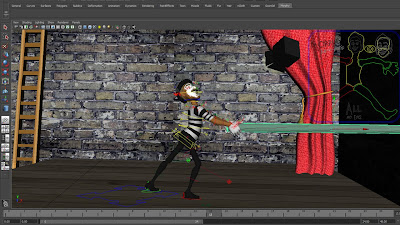
I have done some research on it and I found this video particularly useful for the rope:
- That's it for today I think, will pick this up again tomorrow.

Good tip on how to push your poses without "breaking them":
http://keithlango.blogspot.com/2008/09/pushing-poses.html
So far I find Maya surprisingly "forgiving", especially since I've been a 3dsMax-user for almost four years.. The navigation was my big issue in the beginning, but that has almost become second nature. But ask me to do any sort of modeling or changing a texture, switch on a light or so on and I promise you I'll stare at you with a blank face.. But luckily Scott has been a champion on the 3D-part of this project, he's really made it possible for me to just focus on the animation.
I have been cheating a bit today, meaning I used a primitive (cylinder) to help me pose the rope poses. Mainly just to make sure the hands are in the right position when I repose the character. I think it might be a good solution since the clue to a good "mime-rope" is remembering the distance between your hands and the actual size and weight of the rope.

I have done some research on it and I found this video particularly useful for the rope:
- That's it for today I think, will pick this up again tomorrow.
mandag 5. mars 2012
Monday: Presentation work and pose-sheet for Alfonso.
Today (and the weekend) has mostly been spent working on the presentation. I had a chat with Siobhan about my clips because I was worried they where to long. The clips where about 4 minutes total on a 10 minute presentation, so I realized I would spend almost half the presentation just showing the clips. As I predicted this was too long, but Siobhan suggested I might talk over them to make up for the time it took to run them. I tried this and it sort of worked, but I think it might be a bit distracting. So I took the clips into Premiere and started to edit them. I cut away the bits that was unnecessary and kept the bits I needed to make my points. I managed to cut away over a minute of film so hopefully a bit under 3 minutes is okay. I kind of need that to make the points in my analysis make sense. My subject is on the use of empathy to create comedy, and I therefore need a bit more than a slapstick-gag to explain it.
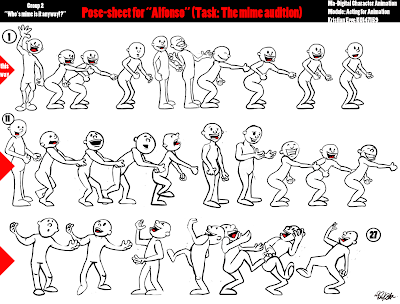
I have also finished my drawn key-poses for the mime-task. I'm planning my key-poses the same way as I did in the last two modules, by making a "pose-sheet". It's a bit more than the key-poses, so I ended up with 27 drawn poses. But I have found this really useful in the previous tasks so I figured I'd stick to that "recipe". It's proven to be very useful to have it up on the second monitor as an additional reference to the actual ref-footage.
The fact that I draw them gives me the freedom to exaggerate the poses I find in the ref-footage while including stronger lines of action and "pushing reality" a bit.
Here is the pose-sheet for Alfonso's act:
I have also finished my drawn key-poses for the mime-task. I'm planning my key-poses the same way as I did in the last two modules, by making a "pose-sheet". It's a bit more than the key-poses, so I ended up with 27 drawn poses. But I have found this really useful in the previous tasks so I figured I'd stick to that "recipe". It's proven to be very useful to have it up on the second monitor as an additional reference to the actual ref-footage.
The fact that I draw them gives me the freedom to exaggerate the poses I find in the ref-footage while including stronger lines of action and "pushing reality" a bit.
Here is the pose-sheet for Alfonso's act:

fredag 2. mars 2012
A video it's worth having a look at
There is a interesting point in this interview with Ricky Gervais on the importance of empathy in comedy:
Ricky Gervais is one of my personal favourites when it comes to comedy. He really knows the importance of creating characters we identify with to make the jokes funnier, whether it's slap-stick, dialogue or just people randomly falling over, he always adds that little moment of embarrassment to make us really feel for the person.
For instance: A character making a fool of him/herself makes us feel sympathy for the person, but what Ricky does a lot in his shows (The Office, Extras & Lifes too short) is make the character try to hide the fact that he just made a fool of himself. This causes us to emphasise with the character, we feel the tension, the embarrassment of it all.
- And that's the clue to making a scene or joke funny and more real to the audience.
Ricky Gervais is one of my personal favourites when it comes to comedy. He really knows the importance of creating characters we identify with to make the jokes funnier, whether it's slap-stick, dialogue or just people randomly falling over, he always adds that little moment of embarrassment to make us really feel for the person.
For instance: A character making a fool of him/herself makes us feel sympathy for the person, but what Ricky does a lot in his shows (The Office, Extras & Lifes too short) is make the character try to hide the fact that he just made a fool of himself. This causes us to emphasise with the character, we feel the tension, the embarrassment of it all.
- And that's the clue to making a scene or joke funny and more real to the audience.
Abonner på:
Innlegg (Atom)